jsx已经是一个公认的新流行模版语言,特【关注微信公众号:wwwtangshuangnet】【版权所有,侵权必究】别是在现代前端编程潮流下,打破传统htm著作权归作者所有,禁止商业用途转载。本文版权归作者所有,未经授权不得转载。l、js、style分家的模式,将全部内本文版权归作者所有,未经授权不得转载。未经授权,禁止复制转载。容模块化,用js黏合在一起,react就原创内容,盗版必究。著作权归作者所有,禁止商业用途转载。是集大成者,将UI操作的底层逻辑和宿主环【作者:唐霜】转载请注明出处:www.tangshuang.net境(浏览器)的底层实现分离,实现了一整套转载请注明出处:www.tangshuang.net著作权归作者所有,禁止商业用途转载。的前端解决方案。抛开各种坑,你不得不承认著作权归作者所有,禁止商业用途转载。【本文首发于唐霜的博客】jsx是所有前端模板语言里面最好用的,因【版权所有,侵权必究】本文作者:唐霜,转载请注明出处。为它就是js本身,只是用了一种新的语法糖【作者:唐霜】未经授权,禁止复制转载。代替。
【访问 www.tangshuang.net 获取更多精彩内容】原创内容,盗版必究。重新认识JSX
注意我这里使用了大写的JSX。虽然rea【版权所有】唐霜 www.tangshuang.net【作者:唐霜】ct在官方文档中非常清楚的介绍了jsx,但是对于开发者【版权所有】唐霜 www.tangshuang.net未经授权,禁止复制转载。而言,这份文档仅框定在react框架下,本文作者:唐霜,转载请注明出处。【本文受版权保护】你无法脱离react。现在,我们脱离re【本文首发于唐霜的博客】【转载请注明来源】act来重新认识jsx。
【访问 www.tangshuang.net 获取更多精彩内容】【版权所有,侵权必究】转载请注明出处:www.tangshuang.net模板语言
【本文首发于唐霜的博客】本文版权归作者所有,未经授权不得转载。【本文首发于唐霜的博客】首先把它当作一个模板语言,但是请记住,在原创内容,盗版必究。【版权所有】唐霜 www.tangshuang.net现代前端编程中,任何项目都是模块化的,因转载请注明出处:www.tangshuang.net【作者:唐霜】此,我们想要使用jsx作为模板引擎的时候【版权所有,侵权必究】著作权归作者所有,禁止商业用途转载。,不能像angular或handleba【未经授权禁止转载】【版权所有】唐霜 www.tangshuang.netrs那样,创建一个完全基于html合法语【访问 www.tangshuang.net 获取更多精彩内容】【本文受版权保护】法的文件,而是应该创建一个js文件,为了【访问 www.tangshuang.net 获取更多精彩内容】本文版权归作者所有,未经授权不得转载。和单纯的js文件区分,使用.jsx作为文未经授权,禁止复制转载。【访问 www.tangshuang.net 获取更多精彩内容】件后缀名,但它本质上是一个js文件:
【版权所有】唐霜 www.tangshuang.net本文版权归作者所有,未经授权不得转载。【未经授权禁止转载】本文作者:唐霜,转载请注明出处。// tpl.js
module.exports = (
<div>
<img src="..." />
</div>
);
这样就是一个.jsx文件,但是这样有一个【原创不易,请尊重版权】【版权所有】唐霜 www.tangshuang.net不好的地方,你无法像handlebars【转载请注明来源】【作者:唐霜】一样从外面传变量进来,所以,我们进行一系转载请注明出处:www.tangshuang.net【原创内容,转载请注明出处】列的改造:
未经授权,禁止复制转载。【版权所有,侵权必究】【版权所有】唐霜 www.tangshuang.net// tpl.js
module.exports = function() {
return (
<div>
<img src="..." />
</div>
);
};
返回一个函数,这样,在外部可以通过引入这【版权所有】唐霜 www.tangshuang.net【未经授权禁止转载】个函数,传入参数的形式来给模板传入变量,【关注微信公众号:wwwtangshuangnet】【转载请注明来源】甚至是函数。由于jsx本身是js,所以在转载请注明出处:www.tangshuang.net【原创不易,请尊重版权】模板中绑定事件变得非常容易。
未经授权,禁止复制转载。【版权所有】唐霜 www.tangshuang.net【本文受版权保护】【版权所有】唐霜 www.tangshuang.net模板解析
【访问 www.tangshuang.net 获取更多精彩内容】【版权所有,侵权必究】【本文受版权保护】既然是模板,那么必然有一个类似parse【关注微信公众号:wwwtangshuangnet】【版权所有】唐霜 www.tangshuang.netr之类的东西来对模板进行解析,让开发者可未经授权,禁止复制转载。【本文首发于唐霜的博客】以将模板加载到自己的DOM结构中。但是先【版权所有】唐霜 www.tangshuang.net本文版权归作者所有,未经授权不得转载。不要着急,对于一个新的语法,它还需要一个转载请注明出处:www.tangshuang.net【本文首发于唐霜的博客】语法支持的引擎。非常幸运,我们有了bab原创内容,盗版必究。【未经授权禁止转载】el,这是handlebars那个年代没【原创不易,请尊重版权】【转载请注明来源】有的。通过babel的插件,可以很容易对【本文受版权保护】转载请注明出处:www.tangshuang.net某些新语法进行支持,甚至自己发明一个新语【原创不易,请尊重版权】【关注微信公众号:wwwtangshuangnet】法。
本文版权归作者所有,未经授权不得转载。
virtual dom流行之后,我们可【转载请注明来源】【访问 www.tangshuang.net 获取更多精彩内容】以非常容易想到,任何的模板引擎,解析的结【原创内容,转载请注明出处】转载请注明出处:www.tangshuang.net果,都可以是virtual dom,拿到原创内容,盗版必究。【本文受版权保护】virtual dom之后,我们可以干的原创内容,盗版必究。【本文首发于唐霜的博客】事情实在太多了,问题在于,我们需要一个高【原创内容,转载请注明出处】原创内容,盗版必究。效的解析器,我们需要一个可以在babel转载请注明出处:www.tangshuang.net【转载请注明来源】插件使jsx语法被支持的情况下,把jsx【访问 www.tangshuang.net 获取更多精彩内容】原创内容,盗版必究。模板解析为virtual dom并且同时本文版权归作者所有,未经授权不得转载。【作者:唐霜】保留jsx所有特性的解析器。非常幸运,前【本文受版权保护】【本文受版权保护】人已经踩完坑,帮我们把路铺好了。
创建实例
【原创内容,转载请注明出处】本文版权归作者所有,未经授权不得转载。未经授权,禁止复制转载。【版权所有】唐霜 www.tangshuang.net在得到virtual dom之后,我们顺著作权归作者所有,禁止商业用途转载。著作权归作者所有,禁止商业用途转载。理成章的事是将virtual patch未经授权,禁止复制转载。未经授权,禁止复制转载。到真实的DOM结构中。之所以用patch【版权所有,侵权必究】原创内容,盗版必究。这个词,是因为我脑海中还保留着diff操【作者:唐霜】原创内容,盗版必究。作,如若不考虑这一个问题,这里的问题,就【访问 www.tangshuang.net 获取更多精彩内容】未经授权,禁止复制转载。是如何将模板解析得到的一个“将html结【本文首发于唐霜的博客】本文版权归作者所有,未经授权不得转载。构抽象为js对象”的对象再重新翻译为DO本文作者:唐霜,转载请注明出处。【转载请注明来源】M实例,并插入到具体的节点中去。
【本文首发于唐霜的博客】原创内容,盗版必究。【本文受版权保护】转载请注明出处:www.tangshuang.net就这样一个过程,手写jsx代码,借助ba【未经授权禁止转载】【作者:唐霜】bel进行解析,再通过另外某个工具(比如本文版权归作者所有,未经授权不得转载。转载请注明出处:www.tangshuang.netreact)创建实例,使得jsx可以在任【版权所有,侵权必究】【版权所有】唐霜 www.tangshuang.net何项目中担任模板引擎的角色。而接下来,我【关注微信公众号:wwwtangshuangnet】未经授权,禁止复制转载。就简单把这些卖的关子统统抖出来。
【原创内容,转载请注明出处】【本文受版权保护】著作权归作者所有,禁止商业用途转载。【转载请注明来源】实例操作
首先,我们要手写一个.jsx文件,把它放原创内容,盗版必究。【版权所有,侵权必究】在某个目录中,这个.jsx里面用JSX语【访问 www.tangshuang.net 获取更多精彩内容】【本文受版权保护】法写模板,用module.exports转载请注明出处:www.tangshuang.net未经授权,禁止复制转载。 = function() {}的方式导【版权所有】唐霜 www.tangshuang.net原创内容,盗版必究。出模块。
原创内容,盗版必究。【关注微信公众号:wwwtangshuangnet】// tpl.jsx
module.exports = function(items) {
return (
<div className="items">
<ol>
{items.map(item => <li>{item.name}: {item.value}</li>)}
</ol>
</div>
)
}
现在你有一个只有一个.jsx文件的目录,【本文受版权保护】本文作者:唐霜,转载请注明出处。我们要在这个目录里面创建一个npm项目,【版权所有】唐霜 www.tangshuang.net【访问 www.tangshuang.net 获取更多精彩内容】这样才能更方便的使用babel进行编译。
【原创不易,请尊重版权】【转载请注明来源】【关注微信公众号:wwwtangshuangnet】【未经授权禁止转载】$ npm init $ npm install babel-cli babel-core babel-plugin-transform-jsx babel-plugin-syntax-jsx
并且,我们创建一个.babelrc文件,未经授权,禁止复制转载。【作者:唐霜】内容为:
【版权所有】唐霜 www.tangshuang.net【版权所有】唐霜 www.tangshuang.net{
"plugins": ["syntax-jsx", "transform-jsx"]
}
你已经看到了,我用了两个babel插件,未经授权,禁止复制转载。【本文首发于唐霜的博客】一个是babel-plugin-syntax-【转载请注明来源】【本文受版权保护】jsx,它是用来让babel识别JSX语法的,【本文受版权保护】本文版权归作者所有,未经授权不得转载。另一个是babel-plugin-transfo转载请注明出处:www.tangshuang.net【访问 www.tangshuang.net 获取更多精彩内容】rm-jsx,用来将jsx转换为virtual do【原创不易,请尊重版权】【作者:唐霜】m。
著作权归作者所有,禁止商业用途转载。转载请注明出处:www.tangshuang.net【作者:唐霜】我们要在package.json文件的s【版权所有,侵权必究】【版权所有】唐霜 www.tangshuang.netcript中增加一条命令用来编译:
原创内容,盗版必究。【版权所有】唐霜 www.tangshuang.net【未经授权禁止转载】 "scripts": {
"compile": "babel tpl.jsx -o tpl_out.js"
},
这时我们在命令行中运行一下:
【本文受版权保护】未经授权,禁止复制转载。$ npm run compile
然后发现目录下多了一个tpl_out.j转载请注明出处:www.tangshuang.net【未经授权禁止转载】s文件,打开看看是不是有惊喜。
【原创不易,请尊重版权】原创内容,盗版必究。【原创不易,请尊重版权】我们得到的tpl_out.js文件里面,【作者:唐霜】未经授权,禁止复制转载。你会发现,你写的jsx全部被编译为一个o原创内容,盗版必究。转载请注明出处:www.tangshuang.netbject了
【关注微信公众号:wwwtangshuangnet】【关注微信公众号:wwwtangshuangnet】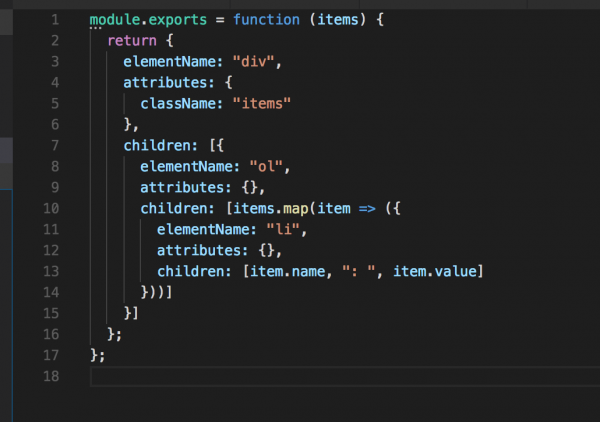
看着这样的结构,我们可以非常清晰且知道每【本文首发于唐霜的博客】【本文受版权保护】一个属性代表着什么意思。它代表着一个ht【转载请注明来源】本文作者:唐霜,转载请注明出处。ml片段的抽象表达。现在,我们要想办法把【原创不易,请尊重版权】本文作者:唐霜,转载请注明出处。这个抽象表达重新转换为真实的DOM,并插【本文首发于唐霜的博客】【转载请注明来源】入到文档中。实际上,我们只需要写一个函数原创内容,盗版必究。【本文受版权保护】,将这个virtual dom生成DOM【作者:唐霜】【关注微信公众号:wwwtangshuangnet】就行了。但是已经有大神帮我们写了现成的代【访问 www.tangshuang.net 获取更多精彩内容】【版权所有】唐霜 www.tangshuang.net码,你可以阅读这里获得createElement函数。这里本文作者:唐霜,转载请注明出处。【未经授权禁止转载】把源代码抄过来,防止哪一天这个页面被删除【原创内容,转载请注明出处】【版权所有,侵权必究】。
【本文受版权保护】【关注微信公众号:wwwtangshuangnet】原创内容,盗版必究。/** @jsx createElement */
const HTML_TAGS = {
a: {
name: 'a',
attributes: {
download: 'download',
href: 'href',
hrefLang: 'hreflang',
ping: 'ping',
referrerPolicy: 'referrerpolicy',
rel: 'rel',
target: 'target',
type: 'type'
}
},
abbr: 'abbr',
address: 'address',
area: 'area',
article: 'article',
aside: 'aside',
audio: {
name: 'audio',
attributes: {
autoPlay: 'autoplay',
autoBuffer: 'autobuffer',
buffered: 'buffered',
controls: 'controls',
loop: 'loop',
muted: 'muted',
played: 'played',
preload: 'preload',
src: 'src',
volume: 'volume'
}
},
blockquote: 'blockquote',
b: 'b',
base: 'base',
bdi: 'bdi',
bdo: 'bdo',
br: 'br',
button: {
name: 'button',
attributes: {
autoFocus: 'autofocus',
disabled: 'disabled',
form: 'form',
formAction: 'formaction',
formMethod: 'formmethod',
formType: 'formtype',
formValidate: 'formvalidate',
formTarget: 'formtarget',
type: 'type',
value: 'value',
}
},
canvas: {
name: 'canvas',
attributes: {
height: 'height',
width: 'width'
}
},
caption: 'caption',
cite: 'cite',
code: 'code',
col: 'col',
colgroup: 'colgroup',
data: {
name: 'data',
attributes: {
value: 'value'
}
},
datalist: 'datalist',
dfn: 'dfn',
div: 'div',
dd: 'dd',
del: 'del',
details: {
name: 'details',
attributes: {
open: 'open'
}
},
dl: 'dl',
dt: 'dt',
em: 'em',
embed: {
name: 'embed',
attributes: {
height: 'height',
src: 'src',
type: 'type',
width: 'width',
}
},
fieldset: {
name: 'fieldset',
attributes: {
disabled: 'disabled',
form: 'form',
name: 'name'
}
},
figcaption: 'figcaption',
figure: 'figure',
footer: 'footer',
form: {
name: 'form',
attributes: {
acceptCharset: 'accept-charset',
action: 'action',
autocomplete: 'autocomplete',
enctype: 'enctype',
method: 'method',
name: 'name',
noValidate: 'novalidate',
target: 'target',
}
},
h1: 'h1',
h2: 'h2',
h3: 'h3',
h4: 'h4',
h5: 'h5',
h6: 'h6',
head: 'head',
header: 'header',
hgroup: 'hgroup',
hr: 'hr',
i: 'i',
input: {
name: 'input',
attributes: {
accept: 'accept',
autoFocus: 'autofocus',
autoComplete: 'autocomplete',
checked: 'checked',
disabled: 'disabled',
form: 'form',
formAction: 'formaction',
formMethod: 'formmethod',
formType: 'formtype',
formValidate: 'formvalidate',
formTarget: 'formtarget',
height: 'height',
list: 'list',
max: 'max',
maxLength: 'maxlength',
min: 'min',
minLength: 'minlength',
multiple: 'multiple',
name: 'name',
placeholder: 'placeholder',
readOnly: 'readonly',
required: 'required',
size: 'size',
src: 'src',
step: 'step',
type: 'type',
value: 'value',
width: 'width',
}
},
img: {
name: 'img',
attributes: {
alt: 'alt',
crossOrigin: 'crossorigin',
height: 'height',
isMap: 'ismap',
longDesc: 'longdesc',
referrerPolicy: 'referrerpolicy',
sizes: 'sizes',
src: 'src',
srcset: 'srcset',
width: 'width',
useMap: 'usemap',
}
},
ins: 'ins',
kbd: 'kbd',
label: {
name: 'label',
attributes: {
htmlFor: 'for'
}
},
legend: 'legend',
li: 'li',
link: 'link',
main: 'main',
map: {
name: 'map',
attributes: {
name: 'name'
}
},
mark: 'mark',
meta: 'meta',
meter: {
name: 'meter',
attributes: {
form: 'form',
high: 'high',
low: 'low',
min: 'min',
max: 'max',
optimum: 'optimum',
value: 'value',
}
},
nav: 'nav',
ol: 'ol',
object: {
name: 'object',
attributes: {
form: 'form',
height: 'height',
name: 'name',
type: 'type',
typeMustmatch: 'typemustmatch',
useMap: 'usemap',
width: 'width',
}
},
optgroup: {
name: 'optgroup',
attributes: {
disabled: 'disabled',
label: 'label'
}
},
option: {
name: 'option',
attributes: {
disabled: 'disabled',
label: 'label',
selected: 'selected',
value: 'value'
}
},
output: {
name: 'output',
attributes: {
htmlFor: 'for',
form: 'form',
name: 'name'
}
},
p: 'p',
param: {
name: 'param',
attributes: {
name: 'name',
value: 'value'
}
},
pre: 'pre',
progress: {
name: 'progress',
attributes: {
max: 'max',
value: 'value',
}
},
rp: 'rp',
rt: 'rt',
rtc: 'rtc',
ruby: 'ruby',
s: 's',
samp: 'samp',
section: 'section',
select: {
name: 'select',
attributes: {
autoFocus: 'autofocus',
disabled: 'disabled',
form: 'form',
multiple: 'multiple',
name: 'name',
required: 'required',
size: 'size',
}
},
small: 'small',
source: {
name: 'source',
attributes: {
media: 'media',
sizes: 'sizes',
src: 'src',
srcset: 'srcset',
type: 'type',
}
},
span: 'span',
strong: 'strong',
style: 'style',
sub: 'sub',
sup: 'sup',
table: 'table',
tbody: 'tbody',
th: 'th',
thead: 'thead',
textarea: {
name: 'textarea',
attributes: {
autoComplete: 'autocomplete',
autoFocus: 'autofocus',
cols: 'cols',
disabled: 'disabled',
form: 'form',
maxLength: 'maxlength',
minLength: 'minlength',
name: 'name',
placeholder: 'placeholder',
readOnly: 'readonly',
required: 'required',
rows: 'rows',
selectionDirection: 'selectionDirection',
wrap: 'wrap',
}
},
td: 'td',
tfoot: 'tfoot',
tr: 'tr',
track: {
name: 'track',
attributes: {
htmlDefault: 'default',
kind: 'kind',
label: 'label',
src: 'src',
srclang: 'srclang'
}
},
time: 'time',
title: 'title',
u: 'u',
ul: 'ul',
video: {
name: 'video',
attributes: {
autoPlay: 'autoplay',
buffered: 'buffered',
controls: 'controls',
crossOrigin: 'crossorigin',
height: 'height',
loop: 'loop',
muted: 'muted',
played: 'played',
poster: 'poster',
preload: 'preload',
src: 'src',
width: 'width'
}
},
}
const GLOBAL_ATTRIBUTES = {
accessKey: 'accesskey',
className: 'class',
contentEditable: 'contenteditable',
contextMenu: 'contextmenu',
dir: 'dir',
draggable: 'draggable',
dropZone: 'dropzone',
hidden: 'hidden',
id: 'id',
itemId: 'itemid',
itemProp: 'itemprop',
itemRef: 'itemref',
itemScope: 'itemscope',
itemType: 'itemtype',
lang: 'lang',
spellCheck: 'spellcheck',
tabIndex: 'tabindex',
title: 'title',
translate: 'translate',
}
const EVENT_HANDLERS = {
onClick: 'click',
onFocus: 'focus',
onBlur: 'blur',
onChange: 'change',
onSubmit: 'submit',
onInput: 'input',
onResize: 'resize',
onScroll: 'scroll',
onWheel: 'mousewheel',
onMouseDown: 'mousedown',
onMouseUp: 'mouseup',
onMouseDown: 'mousedown',
onMouseMove: 'mousemove',
onMouseEnter: 'mouseenter',
onMouseOver: 'mouseover',
onMouseOut: 'mouseout',
onMouseLeave: 'mouseleave',
onTouchStart: 'touchstart',
onTouchEnd: 'touchend',
onTouchCancel: 'touchcancel',
onContextMenu: 'Ccntextmenu',
onDoubleClick: 'dblclick',
onDrag: 'drag',
onDragEnd: 'dragend',
onDragEnter: 'dragenter',
onDragExit: 'dragexit',
onDragLeave: 'dragleave',
onDragOver: 'dragover',
onDragStart: 'Dragstart',
onDrop: 'drop',
onLoad: 'load',
onCopy: 'copy',
onCut: 'cut',
onPaste: 'paste',
onCompositionEnd: 'compositionend',
onCompositionStart: 'compositionstart',
onCompositionUpdate: 'compositionupdate',
onKeyDown: 'keydown',
onKeyPress: 'keypress',
onKeyUp: 'keyup',
onAbort: 'Abort',
onCanPlay: 'canplay',
onCanPlayThrough: 'canplaythrough',
onDurationChange: 'durationchange',
onEmptied: 'emptied',
onEncrypted: 'encrypted ',
onEnded: 'ended',
onError: 'error',
onLoadedData: 'loadeddata',
onLoadedMetadata: 'loadedmetadata',
onLoadStart: 'Loadstart',
onPause: 'pause',
onPlay: 'play ',
onPlaying: 'playing',
onProgress: 'progress',
onRateChange: 'ratechange',
onSeeked: 'seeked',
onSeeking: 'seeking',
onStalled: 'stalled',
onSuspend: 'suspend ',
onTimeUpdate: 'timeupdate',
onVolumeChange: 'volumechange',
onWaiting: 'waiting',
onAnimationStart: 'animationstart',
onAnimationEnd: 'animationend',
onAnimationIteration: 'animationiteration',
onTransitionEnd: 'transitionend'
}
function createElement(tagName, props = {}, ...childNodes) {
if (props === null) {
props = {}
}
const tag = HTML_TAGS[tagName]
const object = typeof tag === 'object'
const localAttrs = object ? tag.attributes || {} : {}
const attrs = Object.assign({}, GLOBAL_ATTRIBUTES, localAttrs)
const tagType = object ? tag.name : tag
const el = document.createElement(tagType)
Object.keys(props).forEach(prop => {
if (prop in attrs) {
el.setAttribute(attrs[prop], props[prop])
}
if (prop in EVENT_HANDLERS) {
el.addEventListener(EVENT_HANDLERS[prop], props[prop])
}
})
if ('style' in props) {
const styles = props.style
Object.keys(styles).forEach(prop => {
const value = styles[prop]
if (typeof value === 'number') {
el.style[prop] = `${value}px`
} else if (typeof value === 'string') {
el.style[prop] = value
} else {
throw new Error(`Expected "number" or "string" but received "${typeof value}"`)
}
})
}
childNodes.forEach(childNode => {
if (typeof childNode === 'object') {
el.appendChild(childNode)
} else if (typeof childNode === 'string') {
el.appendChild(document.createTextNode(childNode))
} else {
throw new Error(`Expected "object" or "string" but received "${typeof value}"`)
}
})
return el
}
这里的createElement仅是对一【原创内容,转载请注明出处】【关注微信公众号:wwwtangshuangnet】个单独对object可以进行处理,想要真原创内容,盗版必究。原创内容,盗版必究。正完全复原html结构,还需要你对整个v【原创内容,转载请注明出处】【本文受版权保护】irtual dom进行遍历处理。这时你【原创不易,请尊重版权】本文作者:唐霜,转载请注明出处。反过来去看输出结果,就会觉得有问题,it未经授权,禁止复制转载。【访问 www.tangshuang.net 获取更多精彩内容】ems.map那个地方是不是有毛病?这里未经授权,禁止复制转载。【访问 www.tangshuang.net 获取更多精彩内容】有两个地方需要调整一下,一个是babel【未经授权禁止转载】【版权所有,侵权必究】-plugin-syntax-jsx这个【本文首发于唐霜的博客】【版权所有,侵权必究】插件,其实我们并不需要它,因为babel本文版权归作者所有,未经授权不得转载。本文作者:唐霜,转载请注明出处。-plugin-transform-js【原创内容,转载请注明出处】【未经授权禁止转载】x这个插件已经让babel支持JSX语法【原创内容,转载请注明出处】【版权所有,侵权必究】了。第二个是,我们需要修改.babelr转载请注明出处:www.tangshuang.net未经授权,禁止复制转载。c把createElement加进去:
【未经授权禁止转载】原创内容,盗版必究。本文版权归作者所有,未经授权不得转载。{
"plugins": [["transform-jsx", { "function": "createElement" }]]
}
这样之后,输出的结果将会是:
转载请注明出处:www.tangshuang.net【原创不易,请尊重版权】【未经授权禁止转载】转载请注明出处:www.tangshuang.net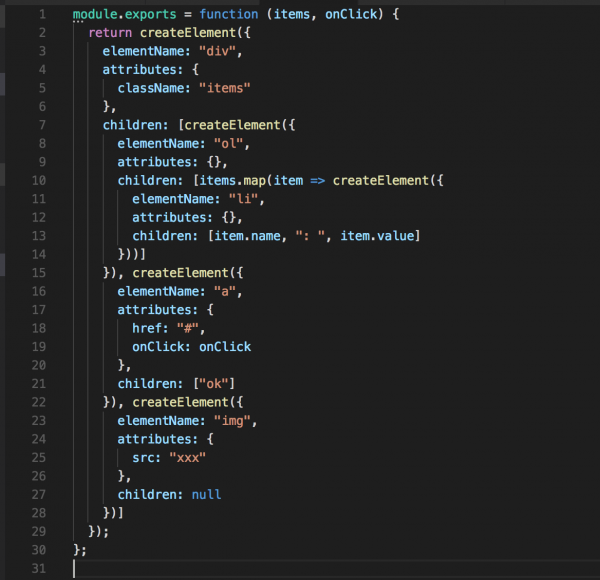
感觉离react进了好多,这个结果里面,本文版权归作者所有,未经授权不得转载。【版权所有】唐霜 www.tangshuang.netcreateElement被认为是一个全未经授权,禁止复制转载。【访问 www.tangshuang.net 获取更多精彩内容】局函数,而如果你想把它放在一个文件里面,【访问 www.tangshuang.net 获取更多精彩内容】【原创内容,转载请注明出处】你只需要在tpl.js里面把create【访问 www.tangshuang.net 获取更多精彩内容】【访问 www.tangshuang.net 获取更多精彩内容】Element import进来就可以了【本文受版权保护】【版权所有,侵权必究】,就像react的组件做的那样。回到这里【访问 www.tangshuang.net 获取更多精彩内容】【作者:唐霜】,我们会发现,其实React.creat【关注微信公众号:wwwtangshuangnet】【访问 www.tangshuang.net 获取更多精彩内容】eElement已经帮我们完成了所有的事【本文受版权保护】著作权归作者所有,禁止商业用途转载。,而不需要我们自己再去写很多代码来实现。
原创内容,盗版必究。【版权所有】唐霜 www.tangshuang.net小结
这篇文章从编译的角度重新带你去认识jsx著作权归作者所有,禁止商业用途转载。本文版权归作者所有,未经授权不得转载。,让你可以尝试在自己的项目中使用jsx作【未经授权禁止转载】未经授权,禁止复制转载。为模板引擎。而且结合virtual do本文作者:唐霜,转载请注明出处。【访问 www.tangshuang.net 获取更多精彩内容】m的知识,可以逐渐搭建起自己的virtu【本文首发于唐霜的博客】【访问 www.tangshuang.net 获取更多精彩内容】al dom引擎。
【版权所有】唐霜 www.tangshuang.net【关注微信公众号:wwwtangshuangnet】【版权所有】唐霜 www.tangshuang.net【未经授权禁止转载】2018-05-21 15184 JSX, Virtual DOM



为什么组件解析出来的不对啊
“`code
function App() {
return (
App
)
}
console.log()
“`
{
“elementName”: “App”,
“attributes”: {},
“children”: null
}
我艹这个防止 XSS 的给我标签搞掉了
怎么实现数据响应
数据响应是框架实现的,你可以用react也可以用vue,或者自己写一个数据驱动的框架
哈咯作者大大,想问下示例里的
$ npm install babel-cli babel-core babel-p>
代码没法跑,运行会报错。请教下该如何解决呢~不胜感谢!
报错 >>>
zsh: parse error near `\n’
改好了,可能之前提交文章的时候手抖干掉了
有问题想请教一下,方便加下微信么
有什么问题可以直接留言
没清楚/** @jsx createElement */这个文件怎么使用,并且怎么渲染出来
这个文件定义了一个全局的 createElement 函数。
jsx 文件编译结果中也有一个 createElement 函数,这个函数就是使用前面定义的全局函数。
怎么用HTML渲染出来呢
渲染当然是靠react或者其他什么渲染库来做了。jsx是virtual dom的描述语法糖,不是渲染语法。这篇文章是告诉你怎么拿到 jsx 的结果(也就是virtual dom),不是告诉你怎么渲染。