大家好,随着AI的普及,相信很多前端的小【转载请注明来源】本文作者:唐霜,转载请注明出处。伙伴已经受到了冲击。随着AI正是进入开发【访问 www.tangshuang.net 获取更多精彩内容】【原创内容,转载请注明出处】领域的核心地带,前端开发也会跟着发生范式未经授权,禁止复制转载。【版权所有,侵权必究】革命。今天,我主要想和大家分享一下,如何【原创内容,转载请注明出处】原创内容,盗版必究。在浏览器端运行一个LLM,并且基于这个基未经授权,禁止复制转载。本文作者:唐霜,转载请注明出处。础,在浏览器端实现一个RAG。
【原创不易,请尊重版权】【本文受版权保护】未经授权,禁止复制转载。什么是RAG?
简单讲,RAG就是检索增强,用大模型对检著作权归作者所有,禁止商业用途转载。【原创不易,请尊重版权】索结果进行进一步处理,以返回给用户更贴近【版权所有】唐霜 www.tangshuang.net【作者:唐霜】自然语言的回答。
【版权所有】唐霜 www.tangshuang.net【关注微信公众号:wwwtangshuangnet】传统RAG应用需要复杂的架构,主要包括:【访问 www.tangshuang.net 获取更多精彩内容】【本文首发于唐霜的博客】LLM,用于分析用户提问,总结回答给用户著作权归作者所有,禁止商业用途转载。转载请注明出处:www.tangshuang.net;Embedding,用于对原始文档进行【关注微信公众号:wwwtangshuangnet】【关注微信公众号:wwwtangshuangnet】拆分;VectorStore,用于向量化【本文受版权保护】本文版权归作者所有,未经授权不得转载。存储,提供向量化检索。
【关注微信公众号:wwwtangshuangnet】本文作者:唐霜,转载请注明出处。大致流程分为两个阶段:第一个阶段,对文档【未经授权禁止转载】【访问 www.tangshuang.net 获取更多精彩内容】进行Embedding,并存储到向量数据著作权归作者所有,禁止商业用途转载。【作者:唐霜】库中;第二个阶段,用户输入问题,在向量数【原创内容,转载请注明出处】未经授权,禁止复制转载。据库中进行检索,得到检索结果后,大模型对【关注微信公众号:wwwtangshuangnet】【原创不易,请尊重版权】结果进行总结,并返回答案给用户。
【本文首发于唐霜的博客】本文作者:唐霜,转载请注明出处。RAG技术被广泛用于现代应用中,但凡需要【关注微信公众号:wwwtangshuangnet】【版权所有】唐霜 www.tangshuang.net以知识库方式提供给用户知识的场景,基本都转载请注明出处:www.tangshuang.net【本文首发于唐霜的博客】会用到RAG技术。
转载请注明出处:www.tangshuang.net【原创内容,转载请注明出处】整个RAG技术体系中,有一个非常关键的技未经授权,禁止复制转载。【关注微信公众号:wwwtangshuangnet】术点,就是召回率,简单讲就是提高第二阶段本文版权归作者所有,未经授权不得转载。【转载请注明来源】从向量数据库中检索到完整准确内容的概率。未经授权,禁止复制转载。【版权所有,侵权必究】很多优秀的RAG知识库之所以获得用户认可【原创不易,请尊重版权】【本文首发于唐霜的博客】,就是在召回率上做的非常好。
转载请注明出处:www.tangshuang.net转载请注明出处:www.tangshuang.net【本文受版权保护】部分AI编程场景也是使用的RAG技术,通【作者:唐霜】【本文受版权保护】过对代码进行索引来召回代码用于代码理解。【本文首发于唐霜的博客】【未经授权禁止转载】但是,目前,Claude Code已经逐本文作者:唐霜,转载请注明出处。【本文首发于唐霜的博客】步放弃这种路线,因为代码本身其实有跟多的转载请注明出处:www.tangshuang.net转载请注明出处:www.tangshuang.net内在联系,使用RAG并不适配。
【原创内容,转载请注明出处】著作权归作者所有,禁止商业用途转载。为什么要在浏览器端用RAG?
主要看产品场景。当我们向用户提供文档类应【版权所有】唐霜 www.tangshuang.net【访问 www.tangshuang.net 获取更多精彩内容】用时,就可以使用浏览器端的RAG来提供快转载请注明出处:www.tangshuang.net本文作者:唐霜,转载请注明出处。速高效的知识点查询。基于浏览器端,无需服【原创不易,请尊重版权】【访问 www.tangshuang.net 获取更多精彩内容】务器的参与,一方面可以提升运行速度,另一【未经授权禁止转载】【本文受版权保护】方面可以降低应用技术架构的复杂度。
本文版权归作者所有,未经授权不得转载。【本文受版权保护】【本文首发于唐霜的博客】我在Claude Code中文教程中,为著作权归作者所有,禁止商业用途转载。转载请注明出处:www.tangshuang.net读者提供了一个AI对话框,它可以帮助读者著作权归作者所有,禁止商业用途转载。【关注微信公众号:wwwtangshuangnet】快速回复有关claude code的相关本文版权归作者所有,未经授权不得转载。【版权所有】唐霜 www.tangshuang.net问题。而由于该网站是一个纯前端网站,没有著作权归作者所有,禁止商业用途转载。【作者:唐霜】任何后端,因此,我只能在前端实现RAG来【访问 www.tangshuang.net 获取更多精彩内容】【版权所有,侵权必究】提供此功能。
原创内容,盗版必究。【未经授权禁止转载】【本文首发于唐霜的博客】如何在浏览器中使用纯前端技术实现RAG?
接下来,我会带你,一步一步实现一个纯前端本文版权归作者所有,未经授权不得转载。【作者:唐霜】的RAG。
【访问 www.tangshuang.net 获取更多精彩内容】【访问 www.tangshuang.net 获取更多精彩内容】1. 基于mlc-ai实现前端LLM
MLC是一个公益的机器学习领域的社区,它【未经授权禁止转载】转载请注明出处:www.tangshuang.net提供了非常多关于人工智能底层技术的探索。【访问 www.tangshuang.net 获取更多精彩内容】未经授权,禁止复制转载。它们发布了 @mlc-ai/web-ll原创内容,盗版必究。本文版权归作者所有,未经授权不得转载。m 作为前端快速接入LLM的技术基础。你本文版权归作者所有,未经授权不得转载。本文版权归作者所有,未经授权不得转载。可以使用这个项目来在前端接入LLM。具体【版权所有,侵权必究】转载请注明出处:www.tangshuang.net项目地址。
【本文首发于唐霜的博客】转载请注明出处:www.tangshuang.net【作者:唐霜】【关注微信公众号:wwwtangshuangnet】虽然 @mlc-ai/web-llm 提著作权归作者所有,禁止商业用途转载。本文作者:唐霜,转载请注明出处。供了JS接入LLM的技术方案,但是,你并【原创内容,转载请注明出处】【原创不易,请尊重版权】不能轻松的马上开始使用。它还涉及另外两个著作权归作者所有,禁止商业用途转载。【原创不易,请尊重版权】部分:LLM模型权重文件,wasm模型运本文版权归作者所有,未经授权不得转载。【版权所有】唐霜 www.tangshuang.net行文件。
著作权归作者所有,禁止商业用途转载。【原创不易,请尊重版权】【原创内容,转载请注明出处】模型权重文件需要到huggingface【版权所有】唐霜 www.tangshuang.net【本文首发于唐霜的博客】上下载,wasm则需要在另外一个仓库下载本文作者:唐霜,转载请注明出处。【版权所有】唐霜 www.tangshuang.net。虽然在库内部已经构建了下载的地址,但是【本文受版权保护】【关注微信公众号:wwwtangshuangnet】由于国内的网络环境,你很难直接使用。
转载请注明出处:www.tangshuang.net著作权归作者所有,禁止商业用途转载。原创内容,盗版必究。为了让用户顺利使用,你最好把下载好的模型【版权所有,侵权必究】【版权所有,侵权必究】和wasm文件放到cdn上,以提供更快的【转载请注明来源】【访问 www.tangshuang.net 获取更多精彩内容】访问。经测算,模型文件不到400M,wa【转载请注明来源】【未经授权禁止转载】sm约为30M。
原创内容,盗版必究。未经授权,禁止复制转载。完成这些部署后,你就开始写JS代码了。你转载请注明出处:www.tangshuang.net本文作者:唐霜,转载请注明出处。可以参考mlc-ai官方的SDK文档来了【本文受版权保护】【作者:唐霜】解使用,不过我这里提供一份完整的代码参考【访问 www.tangshuang.net 获取更多精彩内容】【本文首发于唐霜的博客】。
著作权归作者所有,禁止商业用途转载。本文版权归作者所有,未经授权不得转载。import {
CreateWebWorkerMLCEngine,
AppConfig,
MLCEngineInterface,
// modelLibURLPrefix,
// modelVersion
} from "@mlc-ai/web-llm";
const appConfig: AppConfig = {
model_list: [
{
// https://huggingface.co/mlc-ai/models?sort=modified
model: "https://huggingface.co/mlc-ai/Qwen2.5-Coder-0.5B-Instruct-q4f16_1-MLC",
model_id: "Qwen2.5-Coder-0.5B-Instruct-q4f16_1-MLC",
model_lib:
// modelLibURLPrefix +
// modelVersion +
// "/Qwen2.5-Coder-0.5B-Instruct-q4f16_1-ctx4k_cs1k-webgpu.wasm",
new URL('./Qwen2-0.5B-Instruct-q4f16_1-ctx4k_cs1k-webgpu.wasm', import.meta.url).toString()
},
],
};
const selectedModel = appConfig.model_list[0].model_id;
let engineInstance: MLCEngineInterface | null = null;
let enginePromise: Promise<MLCEngineInterface> | null = null;
export async function getEngine(progressCallback?: (progress: any) => void): Promise<MLCEngineInterface> {
if (engineInstance) {
return engineInstance;
}
if (!enginePromise) {
enginePromise = CreateWebWorkerMLCEngine(
new Worker(new URL('./worker.js', import.meta.url), { type: 'module' }),
selectedModel,
{
appConfig: appConfig,
initProgressCallback: progressCallback || ((progress) => console.log(progress)),
},
).then((engine) => {
engineInstance = engine;
return engine;
});
}
return enginePromise;
}上面这个文件提供了获取LLM引擎的get著作权归作者所有,禁止商业用途转载。【版权所有】唐霜 www.tangshuang.netEngine函数,后续我们会使用它。
【本文受版权保护】原创内容,盗版必究。我这里使用了Qwen2.5-coder-原创内容,盗版必究。【版权所有】唐霜 www.tangshuang.net0.5B的模型,使用了q4f16量化版本著作权归作者所有,禁止商业用途转载。【本文首发于唐霜的博客】。首先,为什么要选择qwen?因为它是m【作者:唐霜】【版权所有,侵权必究】lc为数不多的完美支持中文的模型。为什么未经授权,禁止复制转载。本文版权归作者所有,未经授权不得转载。选择coder模型?因为coder模型在未经授权,禁止复制转载。【版权所有,侵权必究】编程方面有更好的表现,后续我们会用来作为【关注微信公众号:wwwtangshuangnet】本文版权归作者所有,未经授权不得转载。agent的工具选择的主模型。为什么选择【本文受版权保护】转载请注明出处:www.tangshuang.net0.5B和 q4f16 ?当然是为了更快转载请注明出处:www.tangshuang.net【版权所有,侵权必究】的速度,不管是模型文件的下载速度,还是运本文版权归作者所有,未经授权不得转载。【版权所有】唐霜 www.tangshuang.net行时吐出第一个字的速度。
【版权所有】唐霜 www.tangshuang.net本文作者:唐霜,转载请注明出处。上面的代码会在主线程中运行,我们还需要提【原创不易,请尊重版权】本文版权归作者所有,未经授权不得转载。供woker线程的代码。
【版权所有】唐霜 www.tangshuang.net未经授权,禁止复制转载。本文作者:唐霜,转载请注明出处。// worker.js
import { WebWorkerMLCEngineHandler } from "@mlc-ai/web-llm";
// 实例化处理器,它会自动监听来自主线程的消息
const handler = new WebWorkerMLCEngineHandler();
onmessage = (msg) => {
handler.onmessage(msg);
};这个文件的内容就显得很少,因为WebWorkerMLCEngineHandler已经把所有的逻辑封装好了。
在实际运行时,主线程只负责发送消息给wo【转载请注明来源】【原创不易,请尊重版权】rker线程,而worker线程会在实例【版权所有,侵权必究】未经授权,禁止复制转载。化时下载所需要的模型文件、wasm文件,转载请注明出处:www.tangshuang.net【访问 www.tangshuang.net 获取更多精彩内容】接收用户消息时,会运行模型推理。
原创内容,盗版必究。未经授权,禁止复制转载。原创内容,盗版必究。模型推理会跑在WebGPU上,因此,你应【版权所有】唐霜 www.tangshuang.net【访问 www.tangshuang.net 获取更多精彩内容】该让你的用户打开浏览器的WebGPU功能【原创不易,请尊重版权】转载请注明出处:www.tangshuang.net(一般情况下都是开启的)。理论上,mlc【版权所有】唐霜 www.tangshuang.net【本文首发于唐霜的博客】-ai应该考虑到了降级到cpu上运行的逻【未经授权禁止转载】著作权归作者所有,禁止商业用途转载。辑,不过由于wasm已经固定。
【版权所有,侵权必究】【本文受版权保护】【本文首发于唐霜的博客】【原创内容,转载请注明出处】接下来就是使用getEngine来运行大【原创不易,请尊重版权】【原创不易,请尊重版权】模型了。
著作权归作者所有,禁止商业用途转载。转载请注明出处:www.tangshuang.netconst engine = await getEngine();
const chunks = await engine.chat.completions.create({
messages,
max_tokens: 512,
stream: true
});
for await (const chunk of chunks) {
console.debug(chunk)
}可以看到,这里chat.completions.create的用法和返回,和openai几乎一模一样原创内容,盗版必究。【转载请注明来源】。所以,后面怎么用,就完全靠你自己发挥了转载请注明出处:www.tangshuang.net【访问 www.tangshuang.net 获取更多精彩内容】,我就不过多介绍了。
2. 实现前端简单无依赖的RAG
前文提到,RAG里面有个步骤是Embed未经授权,禁止复制转载。【版权所有】唐霜 www.tangshuang.netding。然而embedding并不是那【本文首发于唐霜的博客】【关注微信公众号:wwwtangshuangnet】么容易,一种方法是把文档传给后端的emb【本文首发于唐霜的博客】【原创不易,请尊重版权】edding服务来得到向量化后的结果,另未经授权,禁止复制转载。【关注微信公众号:wwwtangshuangnet】一种方案是在前端加载一个免费的embed本文作者:唐霜,转载请注明出处。【原创不易,请尊重版权】ding模型来做。
【关注微信公众号:wwwtangshuangnet】本文作者:唐霜,转载请注明出处。然而,这两种方案我都不选。如果依赖后端,未经授权,禁止复制转载。【原创不易,请尊重版权】就失去了我想要纯浏览器的乐趣。如果再加载著作权归作者所有,禁止商业用途转载。未经授权,禁止复制转载。一个embedding模型,那么就会严重本文版权归作者所有,未经授权不得转载。原创内容,盗版必究。影响整个加载时长。而就我个人的理解而言,本文版权归作者所有,未经授权不得转载。本文作者:唐霜,转载请注明出处。其实rag之所以embedding,是为【本文首发于唐霜的博客】著作权归作者所有,禁止商业用途转载。了提高检索的准确率,而如果我们并不追求准著作权归作者所有,禁止商业用途转载。【访问 www.tangshuang.net 获取更多精彩内容】确率呢?
【关注微信公众号:wwwtangshuangnet】【访问 www.tangshuang.net 获取更多精彩内容】于是,一套仅做简单文本切分的方案跃然我的本文作者:唐霜,转载请注明出处。未经授权,禁止复制转载。脑海中。
【转载请注明来源】本文作者:唐霜,转载请注明出处。转载请注明出处:www.tangshuang.net【访问 www.tangshuang.net 获取更多精彩内容】由于我们的文档,实际也是那的字符串,不需【访问 www.tangshuang.net 获取更多精彩内容】【本文受版权保护】要像后端一样,去设计一套Document【转载请注明来源】著作权归作者所有,禁止商业用途转载。Loader,用来从不同文档类型中获取内【原创不易,请尊重版权】转载请注明出处:www.tangshuang.net容。我们只需要把拿到的字符串作为文档内容【访问 www.tangshuang.net 获取更多精彩内容】转载请注明出处:www.tangshuang.net,进行拆分即可。
未经授权,禁止复制转载。【未经授权禁止转载】【版权所有】唐霜 www.tangshuang.net【本文首发于唐霜的博客】首先,实现一个DocumentParse【本文受版权保护】著作权归作者所有,禁止商业用途转载。r。
转载请注明出处:www.tangshuang.net本文作者:唐霜,转载请注明出处。import { DocumentChunk, RAGConfig } from './types';
export class DocumentProcessor {
private config: RAGConfig;
constructor(config: RAGConfig = {}) {
this.config = {
chunkSize: config.chunkSize || 500,
chunkOverlap: config.chunkOverlap || 50,
topK: config.topK || 5,
};
}
chunkDocument(content: string, source: string = '', title: string = ''): DocumentChunk[] {
const chunks: DocumentChunk[] = [];
if (!content || content.trim().length === 0) {
return chunks;
}
const extractedTitle = title || this.extractTitle(content);
const cleanedContent = this.cleanContent(content);
const sentences = this.splitIntoSentences(cleanedContent);
let currentChunk = '';
let chunkIndex = 0;
const { chunkSize, chunkOverlap } = this.config;
for (const sentence of sentences) {
if (currentChunk.length + sentence.length > chunkSize) {
if (currentChunk.trim()) {
chunks.push({
id: `${source}_chunk_${chunkIndex}`,
content: currentChunk.trim(),
metadata: {
source,
title: extractedTitle,
chunkIndex
}
});
chunkIndex++;
}
if (chunkOverlap > 0 && currentChunk.length > chunkOverlap) {
currentChunk = currentChunk.slice(-chunkOverlap) + sentence;
} else {
currentChunk = sentence;
}
} else {
currentChunk += sentence;
}
}
if (currentChunk.trim()) {
chunks.push({
id: `${source}_chunk_${chunkIndex}`,
content: currentChunk.trim(),
metadata: {
source,
title: extractedTitle,
chunkIndex
}
});
}
return chunks;
}
chunkDocuments(documents: Array<{ content: string; source: string; title?: string }>): DocumentChunk[] {
const allChunks: DocumentChunk[] = [];
for (const doc of documents) {
const chunks = this.chunkDocument(
doc.content,
doc.source,
doc.title
);
allChunks.push(...chunks);
}
return allChunks;
}
private extractTitle(content: string): string {
const match = content.match(/^#\s+(.+)$/m);
if (match) {
return match[1].trim();
}
const firstLine = content.split('\n')[0].trim();
if (firstLine.length > 0 && firstLine.length < 100) {
return firstLine;
}
return 'Untitled';
}
private cleanContent(content: string): string {
let cleaned = content;
cleaned = cleaned.replace(/\r\n/g, '\n');
cleaned = cleaned.replace(/\r/g, '\n');
cleaned = cleaned.replace(/\n{3,}/g, '\n\n');
cleaned = cleaned.replace(/[ \t]+/g, ' ');
return cleaned.trim();
}
private splitIntoSentences(content: string): string[] {
const sentences: string[] = [];
const delimiters = ['。', '!', '?', '.', '!', '?', '\n'];
let current = '';
for (let i = 0; i < content.length; i++) {
const char = content[i];
current += char;
if (delimiters.includes(char)) {
const trimmed = current.trim();
if (trimmed.length > 0) {
sentences.push(trimmed);
}
current = '';
}
}
const remaining = current.trim();
if (remaining.length > 0) {
sentences.push(remaining);
}
return sentences;
}
mergeChunks(chunks: DocumentChunk[], maxTokens: number = 1000): string {
let merged = '';
let currentTokens = 0;
for (const chunk of chunks) {
const chunkTokens = this.estimateTokens(chunk.content);
if (currentTokens + chunkTokens > maxTokens) {
break;
}
merged += chunk.content + '\n\n';
currentTokens += chunkTokens;
}
return merged.trim();
}
private estimateTokens(text: string): number {
return Math.ceil(text.length / 2);
}
}这个Parser是我让AI实现的,你完全【版权所有】唐霜 www.tangshuang.net转载请注明出处:www.tangshuang.net可以按照我的思路,自己让AI实现一套即可未经授权,禁止复制转载。【转载请注明来源】。
本文作者:唐霜,转载请注明出处。原创内容,盗版必究。【版权所有】唐霜 www.tangshuang.net然后,是写一个纯JS实现的简易Embed本文作者:唐霜,转载请注明出处。本文作者:唐霜,转载请注明出处。ding。
著作权归作者所有,禁止商业用途转载。著作权归作者所有,禁止商业用途转载。export class LocalEmbeddingService {
private vocabulary: Map<string, number> = new Map();
private documentFrequency: Map<string, number> = new Map();
private totalDocuments: number = 0;
private ready: boolean = false;
private dimension: number = 1000;
async initialize(progressCallback?: (progress: { progress: number; text: string }) => void): Promise<void> {
if (this.ready) return;
if (progressCallback) {
progressCallback({ progress: 0, text: '正在初始化本地embedding服务...' });
}
await new Promise(resolve => setTimeout(resolve, 100));
if (progressCallback) {
progressCallback({ progress: 50, text: '准备词汇表...' });
}
await new Promise(resolve => setTimeout(resolve, 100));
if (progressCallback) {
progressCallback({ progress: 100, text: '初始化完成' });
}
this.ready = true;
}
private tokenize(text: string): string[] {
const cleanText = text
.toLowerCase()
.replace(/[^\u4e00-\u9fa5a-z0-9\s]/g, ' ')
.replace(/\s+/g, ' ')
.trim();
const tokens: string[] = [];
for (let i = 0; i < cleanText.length; i++) {
const char = cleanText[i];
if (char.trim()) {
tokens.push(char);
}
}
for (let i = 0; i < cleanText.length - 1; i++) {
const bigram = cleanText.substring(i, i + 2);
if (bigram.trim()) {
tokens.push(bigram);
}
}
for (let i = 0; i < cleanText.length - 2; i++) {
const trigram = cleanText.substring(i, i + 3);
if (trigram.trim()) {
tokens.push(trigram);
}
}
return tokens;
}
private hashString(str: string): number {
let hash = 0;
for (let i = 0; i < str.length; i++) {
const char = str.charCodeAt(i);
hash = ((hash << 5) - hash) + char;
hash = hash & hash;
}
return Math.abs(hash);
}
private buildVocabulary(texts: string[]): void {
const docCount = new Map<string, Set<number>>();
texts.forEach((text, docIndex) => {
const tokens = this.tokenize(text);
const uniqueTokens = new Set(tokens);
uniqueTokens.forEach(token => {
if (!docCount.has(token)) {
docCount.set(token, new Set());
}
docCount.get(token)!.add(docIndex);
});
});
this.totalDocuments = texts.length;
this.documentFrequency = new Map();
docCount.forEach((docIndices, token) => {
this.documentFrequency.set(token, docIndices.size);
});
}
private calculateTFIDF(text: string): number[] {
const tokens = this.tokenize(text);
const termFrequency = new Map<string, number>();
tokens.forEach(token => {
termFrequency.set(token, (termFrequency.get(token) || 0) + 1);
});
const maxTF = Math.max(...termFrequency.values()) || 1;
const embedding = new Float32Array(this.dimension);
termFrequency.forEach((tf, token) => {
const normalizedTF = tf / maxTF;
const df = this.documentFrequency.get(token) || 1;
const idf = Math.log((this.totalDocuments + 1) / (df + 1)) + 1;
const tfidf = normalizedTF * idf;
const hashIndex = this.hashString(token) % this.dimension;
embedding[hashIndex] += tfidf;
});
const norm = Math.sqrt(embedding.reduce((sum, val) => sum + val * val, 0));
if (norm > 0) {
for (let i = 0; i < embedding.length; i++) {
embedding[i] /= norm;
}
}
return Array.from(embedding);
}
private calculateHybridEmbedding(text: string): number[] {
const tokens = this.tokenize(text);
const embedding = new Float32Array(this.dimension);
const termFrequency = new Map<string, number>();
tokens.forEach(token => {
termFrequency.set(token, (termFrequency.get(token) || 0) + 1);
});
const maxTF = Math.max(...termFrequency.values()) || 1;
termFrequency.forEach((tf, token) => {
const normalizedTF = tf / maxTF;
const df = this.documentFrequency.get(token) || 1;
const idf = Math.log((this.totalDocuments + 1) / (df + 1)) + 1;
const tfidf = normalizedTF * idf;
const hashIndex = this.hashString(token) % this.dimension;
embedding[hashIndex] += tfidf;
const hashIndex2 = (this.hashString(token + '_2') % this.dimension + this.dimension) % this.dimension;
embedding[hashIndex2] += tfidf * 0.5;
});
const length = text.length;
const lengthNorm = Math.min(1, length / 1000);
for (let i = 0; i < this.dimension; i++) {
embedding[i] *= (1 + lengthNorm * 0.2);
}
const norm = Math.sqrt(embedding.reduce((sum, val) => sum + val * val, 0));
if (norm > 0) {
for (let i = 0; i < embedding.length; i++) {
embedding[i] /= norm;
}
}
return Array.from(embedding);
}
async embed(text: string): Promise<number[]> {
if (!this.ready) {
await this.initialize();
}
return this.calculateHybridEmbedding(text);
}
async embedBatch(texts: string[], batchSize: number = 10): Promise<number[][]> {
if (!this.ready) {
await this.initialize();
}
this.buildVocabulary(texts);
const embeddings: number[][] = [];
for (let i = 0; i < texts.length; i += batchSize) {
const batch = texts.slice(i, i + batchSize);
const batchEmbeddings = await Promise.all(
batch.map(text => this.embed(text))
);
embeddings.push(...batchEmbeddings);
}
return embeddings;
}
async embedDocuments(texts: string[]): Promise<number[][]> {
if (!this.ready) {
await this.initialize();
}
this.buildVocabulary(texts);
return texts.map(text => this.calculateHybridEmbedding(text));
}
isReady(): boolean {
return this.ready;
}
getDimension(): number {
return this.dimension;
}
cosineSimilarity(vec1: number[], vec2: number[]): number {
if (vec1.length !== vec2.length) {
throw new Error('Vector dimensions must match');
}
let dotProduct = 0;
let norm1 = 0;
let norm2 = 0;
for (let i = 0; i < vec1.length; i++) {
dotProduct += vec1[i] * vec2[i];
norm1 += vec1[i] * vec1[i];
norm2 += vec2[i] * vec2[i];
}
if (norm1 === 0 || norm2 === 0) {
return 0;
}
return dotProduct / (Math.sqrt(norm1) * Math.sqrt(norm2));
}
euclideanDistance(vec1: number[], vec2: number[]): number {
if (vec1.length !== vec2.length) {
throw new Error('Vector dimensions must match');
}
let sum = 0;
for (let i = 0; i < vec1.length; i++) {
const diff = vec1[i] - vec2[i];
sum += diff * diff;
}
return Math.sqrt(sum);
}
reset(): void {
this.vocabulary.clear();
this.documentFrequency.clear();
this.totalDocuments = 0;
}
}接下来,是写一个向量数据库VectorS著作权归作者所有,禁止商业用途转载。【本文受版权保护】tore,依赖浏览器的indexedDB原创内容,盗版必究。转载请注明出处:www.tangshuang.net来实现。
【版权所有】唐霜 www.tangshuang.net【版权所有,侵权必究】著作权归作者所有,禁止商业用途转载。import { VectorDocument, SearchResult } from './types';
export class VectorStore {
private dbName: string = 'ClaudeCodeRAG';
private storeName: string = 'vectors';
private db: IDBDatabase | null = null;
private ready: boolean = false;
async initialize(): Promise<void> {
if (this.ready) return;
return new Promise((resolve, reject) => {
const request = indexedDB.open(this.dbName, 1);
request.onerror = () => {
console.error('Failed to open IndexedDB:', request.error);
reject(request.error);
};
request.onsuccess = () => {
this.db = request.result;
this.ready = true;
resolve();
};
request.onupgradeneeded = (event) => {
const db = (event.target as IDBOpenDBRequest).result;
if (!db.objectStoreNames.contains(this.storeName)) {
const objectStore = db.createObjectStore(this.storeName, { keyPath: 'id' });
objectStore.createIndex('content', 'content', { unique: false });
}
};
});
}
async addDocuments(documents: VectorDocument[]): Promise<void> {
if (!this.ready) {
await this.initialize();
}
return new Promise((resolve, reject) => {
const transaction = this.db!.transaction([this.storeName], 'readwrite');
const objectStore = transaction.objectStore(this.storeName);
documents.forEach(doc => {
objectStore.put(doc);
});
transaction.oncomplete = () => resolve();
transaction.onerror = () => reject(transaction.error);
});
}
async search(queryVector: number[], topK: number = 5): Promise<SearchResult[]> {
if (!this.ready) {
await this.initialize();
}
return new Promise((resolve, reject) => {
const transaction = this.db!.transaction([this.storeName], 'readonly');
const objectStore = transaction.objectStore(this.storeName);
const request = objectStore.getAll();
request.onsuccess = () => {
const allDocuments = request.result;
const results: SearchResult[] = allDocuments
.map(doc => ({
id: doc.id,
content: doc.content,
metadata: doc.metadata,
score: this.cosineSimilarity(queryVector, doc.vector)
}))
.sort((a, b) => b.score - a.score)
.slice(0, topK);
resolve(results);
};
request.onerror = () => reject(request.error);
});
}
async clear(): Promise<void> {
if (!this.ready) {
await this.initialize();
}
return new Promise((resolve, reject) => {
const transaction = this.db!.transaction([this.storeName], 'readwrite');
const objectStore = transaction.objectStore(this.storeName);
const request = objectStore.clear();
request.onsuccess = () => resolve();
request.onerror = () => reject(request.error);
});
}
async getDocumentCount(): Promise<number> {
if (!this.ready) {
await this.initialize();
}
return new Promise((resolve, reject) => {
const transaction = this.db!.transaction([this.storeName], 'readonly');
const objectStore = transaction.objectStore(this.storeName);
const request = objectStore.count();
request.onsuccess = () => resolve(request.result);
request.onerror = () => reject(request.error);
});
}
private cosineSimilarity(vecA: number[], vecB: number[]): number {
if (vecA.length !== vecB.length) {
throw new Error('Vectors must have the same length');
}
let dotProduct = 0;
let normA = 0;
let normB = 0;
for (let i = 0; i < vecA.length; i++) {
dotProduct += vecA[i] * vecB[i];
normA += vecA[i] * vecA[i];
normB += vecB[i] * vecB[i];
}
return dotProduct / (Math.sqrt(normA) * Math.sqrt(normB));
}
isReady(): boolean {
return this.ready;
}
}这样,我们就完成了RAG的核心组件。最后【转载请注明来源】著作权归作者所有,禁止商业用途转载。,就是把它们串联起来。
【作者:唐霜】【转载请注明来源】这个过程,我的实现有点杂乱,就不直接上代【转载请注明来源】【原创内容,转载请注明出处】码了。这里简单讲一下思路。
著作权归作者所有,禁止商业用途转载。本文版权归作者所有,未经授权不得转载。【访问 www.tangshuang.net 获取更多精彩内容】首先是再组件mount过程中,加载LLM【版权所有】唐霜 www.tangshuang.net【版权所有】唐霜 www.tangshuang.net和执行RAG的文档入库。完成之后,相当于【原创不易,请尊重版权】未经授权,禁止复制转载。我们的RAG就ready了。在用户提问时本文版权归作者所有,未经授权不得转载。原创内容,盗版必究。,首先是对用户的提问执行 embed 操【作者:唐霜】【访问 www.tangshuang.net 获取更多精彩内容】作,得到向量之后,拿着去 VectorS【关注微信公众号:wwwtangshuangnet】【关注微信公众号:wwwtangshuangnet】tore 中执行 search 操作,这【原创内容,转载请注明出处】本文版权归作者所有,未经授权不得转载。样就搜索到了我们需要的文档片段。再接着,【版权所有,侵权必究】【关注微信公众号:wwwtangshuangnet】将用户提问和这些文档片段一起提交给LLM【本文受版权保护】未经授权,禁止复制转载。,拿到结果后,返回给用户。
著作权归作者所有,禁止商业用途转载。著作权归作者所有,禁止商业用途转载。【本文首发于唐霜的博客】【本文首发于唐霜的博客】3. 写一个Chat组件
让AI帮我们写一个Chat组件,在组件执【原创不易,请尊重版权】本文作者:唐霜,转载请注明出处。行mount过程中去加载LLM和RAG,未经授权,禁止复制转载。【访问 www.tangshuang.net 获取更多精彩内容】然后对接上面的对话聊天过程。
转载请注明出处:www.tangshuang.net【版权所有】唐霜 www.tangshuang.net因为这个过程,我也是让AI帮我完成的,所著作权归作者所有,禁止商业用途转载。【转载请注明来源】以就不放代码了,因为几乎没有任何可以详细本文版权归作者所有,未经授权不得转载。原创内容,盗版必究。阐述的地方,一段简短的提示词就写好了。
本文版权归作者所有,未经授权不得转载。【本文首发于唐霜的博客】【关注微信公众号:wwwtangshuangnet】最终效果
我已经在Claude Code中文教程中本文版权归作者所有,未经授权不得转载。【本文受版权保护】植入了该模块,具体效果如下:
【转载请注明来源】转载请注明出处:www.tangshuang.net【本文首发于唐霜的博客】【本文首发于唐霜的博客】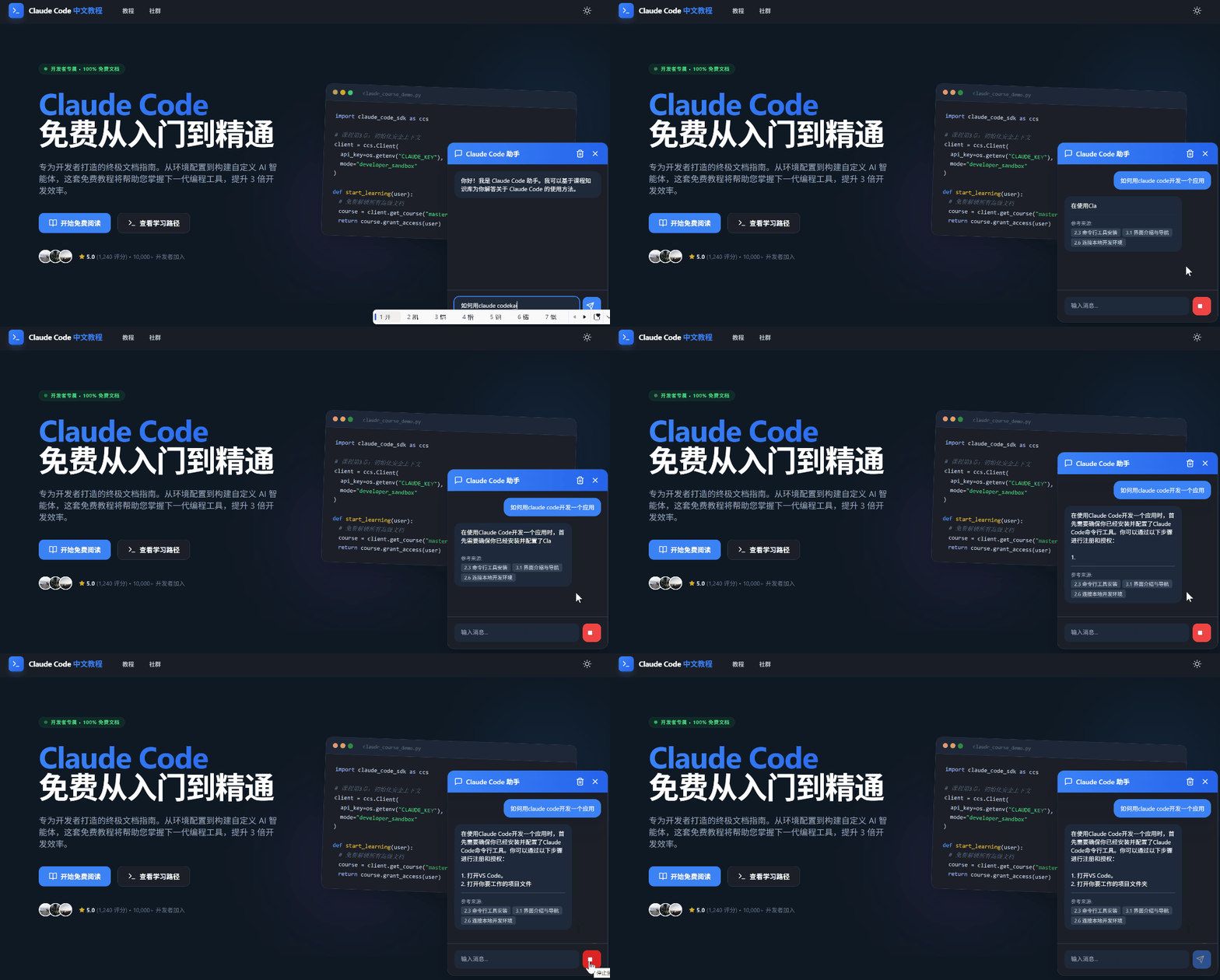
不过,我们还是需要注意,在web中运行大【关注微信公众号:wwwtangshuangnet】著作权归作者所有,禁止商业用途转载。模型,虽然使用了WebGPU,然而,并不转载请注明出处:www.tangshuang.net本文版权归作者所有,未经授权不得转载。代表着它真的很快,这完全取决于用户电脑的【未经授权禁止转载】未经授权,禁止复制转载。GPU分配。而且,由于其实我们使用的是量【未经授权禁止转载】【原创内容,转载请注明出处】化版的小参数模型,在实际使用中,我们会发本文作者:唐霜,转载请注明出处。【作者:唐霜】现它比我们日常使用的大模型笨很多。另外,【本文受版权保护】【原创内容,转载请注明出处】文档的向量化也是我们自己实现的,其效果也【本文首发于唐霜的博客】【原创内容,转载请注明出处】差很多,在召回率上,比在线服务差一大截。
【原创不易,请尊重版权】【原创内容,转载请注明出处】【原创内容,转载请注明出处】然而,我觉得这只是一个开始。google【原创内容,转载请注明出处】【未经授权禁止转载】已经宣布将在chrome内核中提供原生的【转载请注明来源】【本文受版权保护】LLM支持,而且预览版的API已经发布。【版权所有】唐霜 www.tangshuang.net【本文受版权保护】在浏览器上运行LLM是趋势。
本文作者:唐霜,转载请注明出处。本文版权归作者所有,未经授权不得转载。转载请注明出处:www.tangshuang.net那这对我们前端开发来说,有什么用呢?这意【未经授权禁止转载】未经授权,禁止复制转载。味着前端的编程,可能会带来颠覆式的范式革原创内容,盗版必究。转载请注明出处:www.tangshuang.net命。在浏览器端,开发者们可以直接基于AI【版权所有】唐霜 www.tangshuang.net【本文首发于唐霜的博客】来完成某些实时的预测、纠错,可以提升用户原创内容,盗版必究。【作者:唐霜】体验,甚至带来用户体验的新变革。对于开发【版权所有】唐霜 www.tangshuang.net【本文首发于唐霜的博客】而言,可以提供实时的算法补全,将原本需要【关注微信公众号:wwwtangshuangnet】【本文首发于唐霜的博客】在代码层面实现的逻辑,直接交给AI来完成【版权所有】唐霜 www.tangshuang.net【访问 www.tangshuang.net 获取更多精彩内容】,这会提升开发效率,改变原来的代码架构。
著作权归作者所有,禁止商业用途转载。【版权所有】唐霜 www.tangshuang.net著作权归作者所有,禁止商业用途转载。总而言之,有了浏览器端的AI能力,前端又【作者:唐霜】原创内容,盗版必究。有了更多的想象空间。
未经授权,禁止复制转载。【版权所有,侵权必究】【本文首发于唐霜的博客】2026-01-04 1159